
Observability

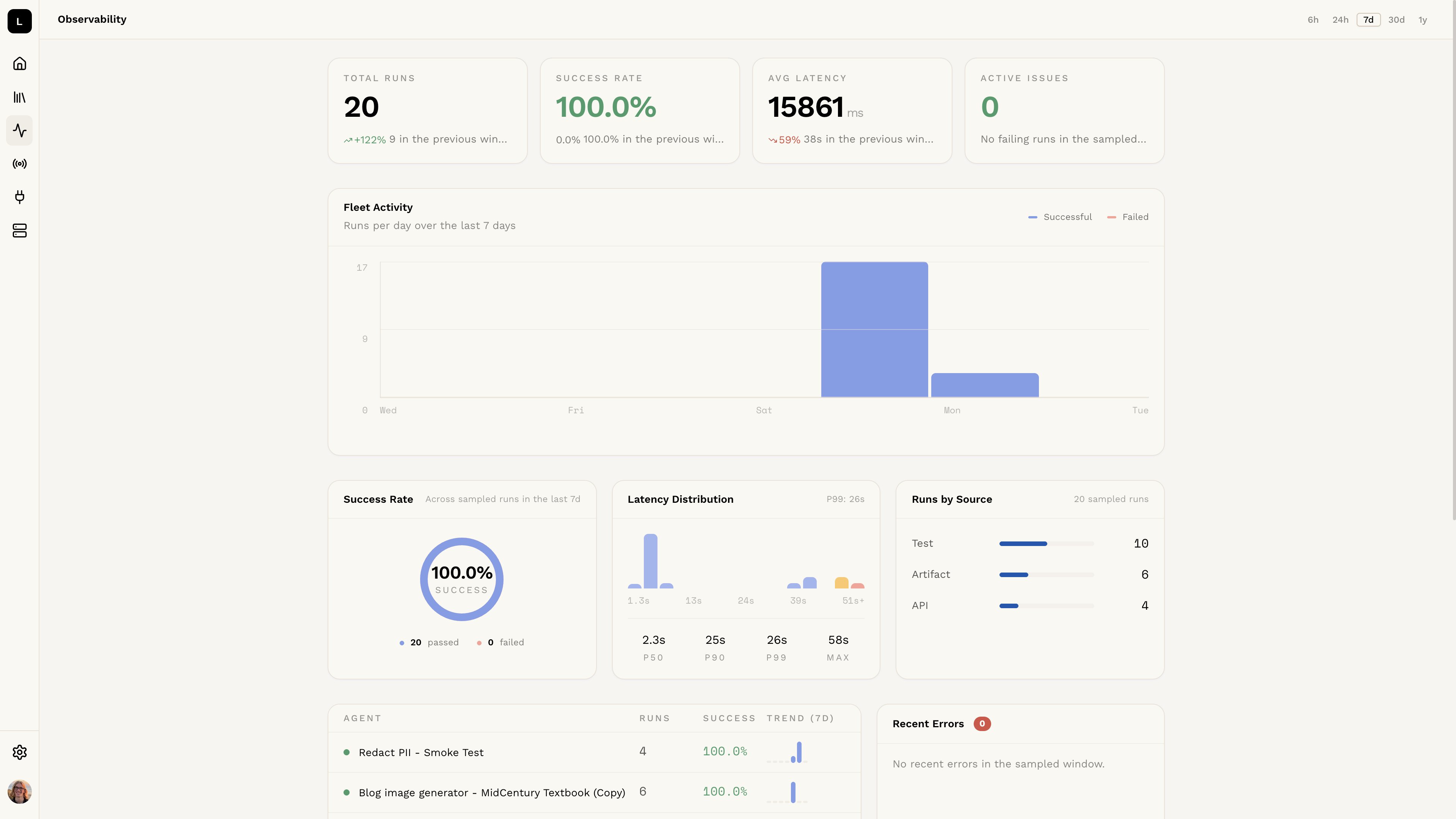
Logic provides an observability dashboard for each agent, giving you a real-time view of how your agent is performing in production. You can access it from the Version observability tab in the agent editor. observability

Summary Stats

At the top of the page you’ll find high-level metrics for the selected time range:
  • Total Runs — the total number of executions
  • Execution Rate — the percentage of executions that completed successfully
  • Avg Latency — the average time taken to execute the agent
  • Active Errors — the number of distinct errors currently occurring
Use the time range buttons (24h, 7d, 30d) to adjust the window, or click Customize to set a custom range.

Agent Activity

A bar chart showing execution volume over time, helping you spot traffic spikes or drops at a glance.

Success Rate & Latency Distribution

A breakdown of successful vs. failed executions, alongside a latency histogram showing the spread of response times across your runs.

Runs by Source

Shows which sources (API, webhook, email, etc.) are triggering your agent, so you can understand where your traffic is coming from.

Recent Errors

A live feed of the most recent errors encountered during execution. Click any error to see more detail.

Global Observability

To see execution stats across all agents in your organization at once, click View global observability in the top right corner of the observability page.