

Making an Agent that Provides Recommendations

To make an agent that provides recommendations to the user, all you need to do is state the input you want to analyze and the type of recommendation you want to make in the agent’s body. The Logic API will automatically handle the rest. song rec demo
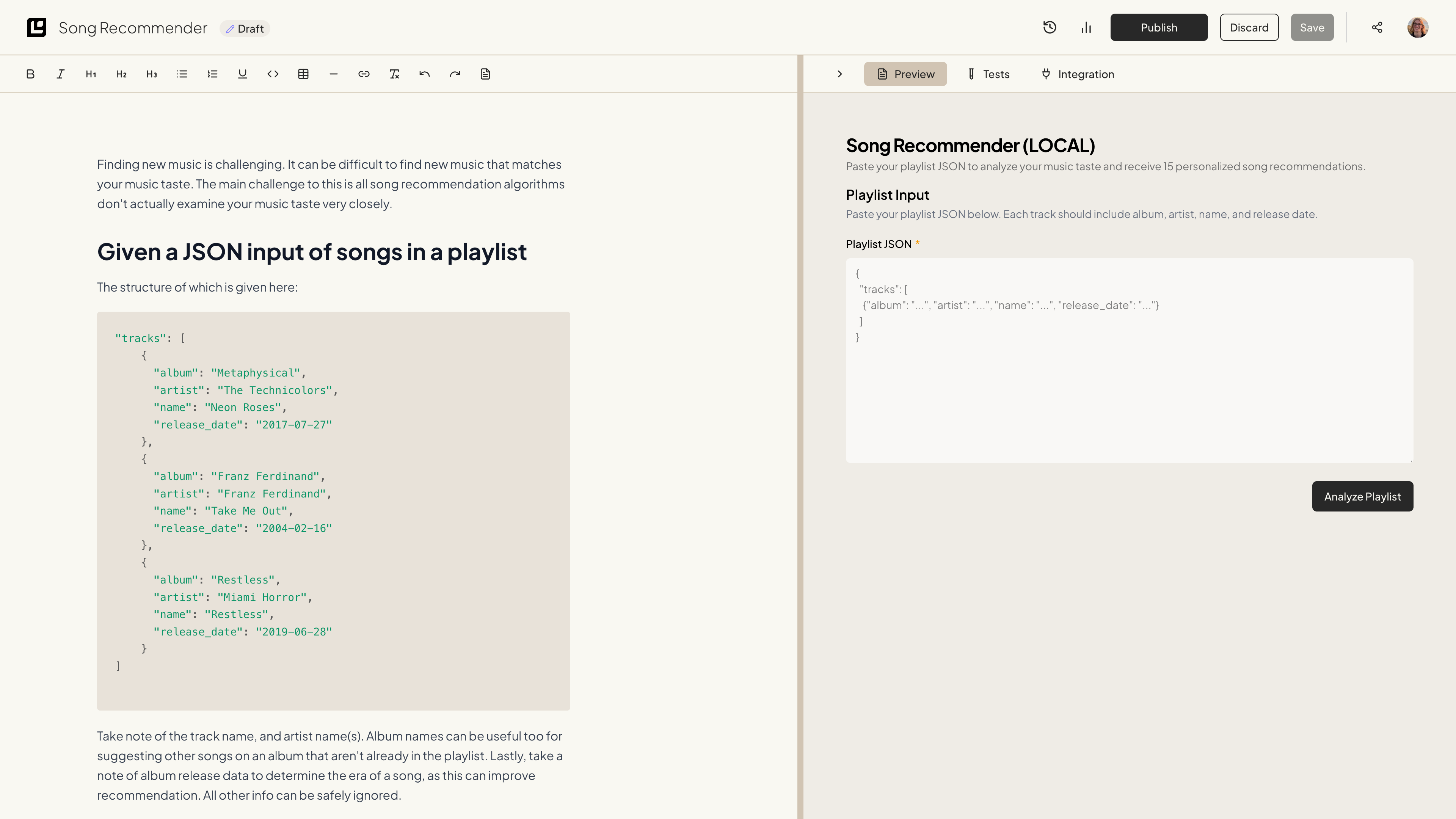
Step 1: Creating the agent

For this example, let’s create an agent that recommends songs to the user based on their input. The agent will analyze the user’s input and provide a recommendation. For the input on this agent, we will use the contents of a CSV file of songs from a playlist. It’s easy to convert Spotify playlists to CSV files, and we can use this to create an app that reads from the Spotify API later.

Step 2: Explain the goal

Let’s start by explaining what we want the Logic API to do. We want the agent to analyze the user’s input and provide a recommendation based on the input. The agent will read from a CSV file of songs from a playlist, analyze the user’s taste, and provide 5 recommendation songs. We want the agent to take note of the following:
  • The songs in the playlist
  • The artists of the songs
  • The albums of the songs
  • The release dates of the songs
  • The genres of the songs

Step 3: Explain the input

To give the Logic API some extra context, let’s make sure to explain the input we want to analyze. We will be providing a CSV file of songs from a playlist. The CSV file will contain the following data:
CSV file contents

Step 4: Give an example

We also want to provide an example of the CSV file contents and an example recommendation.
Examples
We want to make sure to set some ground rules for the recommendation. For example, we want to make sure that the recommendation is based on the user’s input and that it is relevant to the user’s input. We also want to make sure we don’t recommend songs that are already in the user’s playlist.

Step 5: Testing this iteration of the agent

Using the Preview button, we can test this agent to see if it works as expected.
Logic API Output
When testing this agent, the Logic API gave a recommendation based on the user’s input. The agent was able to analyze the user’s input and provide a recommendation based on the input. The agent also provided a list of songs that were similar to the user’s input. One of the songs that was recommended was by an artist that was already in the user’s playlist. However, it was a new song, and was off of a different album. Three of the other recommendations were by artists that were not in the user’s playlist, but were songs that the user already had in other playlists. This suggests these were accurate recommendations, as the user does already like these songs. One last recommendation was a song that was not in the user’s library at all. The song was by a new artist, and was a similar genre to the user’s input. This is a good recommendation, as the Logic API was able to find completely new music for the user.

Conclusion

In summary, generating an agent that provides recommendations is straightforward with the Logic API. By specifying the input to be analyzed and the desired type of recommendation within the agent body, the Logic API will automatically perform the necessary processing. Now, you can publish your agent and begin using the API to provide recommendations to your users. You could make an app or website that reads from the Spotify API to get the user’s playlists, and also uses the API to create a new playlist with the recommendations.