> ## Documentation Index
> Fetch the complete documentation index at: https://docs.logic.inc/llms.txt
> Use this file to discover all available pages before exploring further.
# Agent Schemas
> Understanding the input and output schema of an agent
## Input and Output Schema
The **Inputs** and **Outputs** of the **Data Contract** section provide information on the input and output data for your agent's API. This includes the data types and descriptions of each field.
You can use this information to understand how to structure your requests and responses when calling your agent's API.
Input and output schemas will be a JSON object. The exact structure depends on your agent, but an example can be found below:
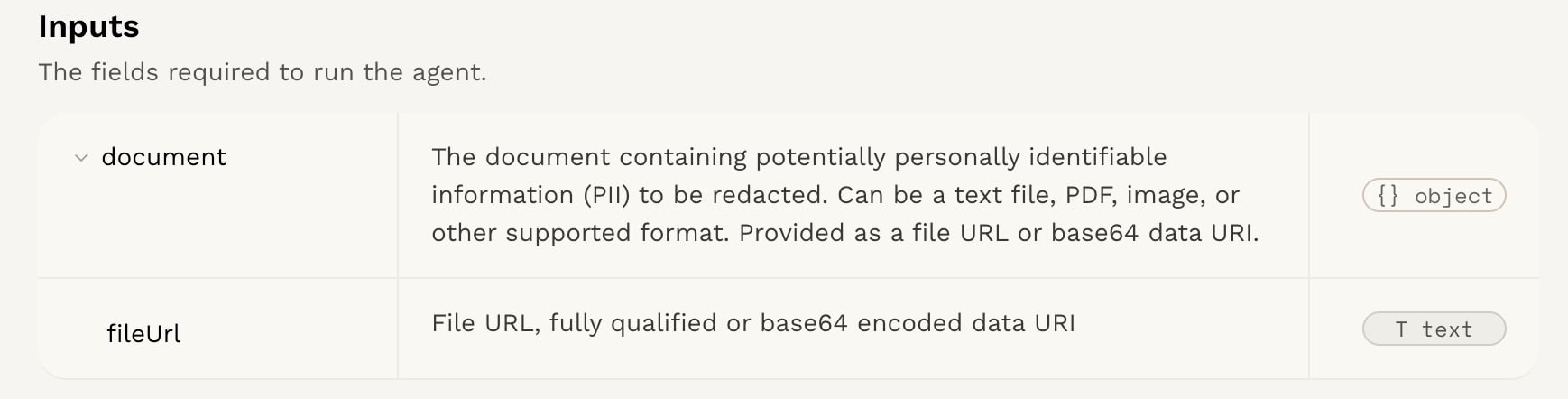 ### Input Schema Example
```json theme={null}
{
"content": {
"type": "string",
"description": "The text content from which PII should be redacted."
}
}
```
This schema indicates that the input to the agent's API should be a JSON object with a single field, `content`, which is a string containing the text to be processed.
You can find the API endpoint and a link to the REST API docs in the **Entrypoints** section as well.
### Output Schema Example
```json theme={null}
{
"redactedText": {
"type": "string",
"description": "The text with all detected PII replaced by appropriate placeholders (e.g., {{ name }}, {{ email }})."
},
"redactedEntities": {
"type": "array",
"description": "A list of entities that were redacted from the original content.",
"items": {
"type": "string",
"description": "A single entity that was redacted from the content."
}
}
}
```
This schema indicates that the output from the agent's API will be a JSON object with two fields: `redactedText`, which is a string containing the text with PII redacted, and `redactedEntities`, which is an array of strings listing the entities that were redacted.
You can find the API endpoint and a link to the REST API docs in the **Entrypoints** section as well.
The input and output schemas will differ depending on your agent.
## Get started with the API
Now that you understand the input and output schema, you can start using the API for your agent.
Learn how to get started with the API in the [Using the
API](/guides/integration-and-testing/api) section.
### Input Schema Example
```json theme={null}
{
"content": {
"type": "string",
"description": "The text content from which PII should be redacted."
}
}
```
This schema indicates that the input to the agent's API should be a JSON object with a single field, `content`, which is a string containing the text to be processed.
You can find the API endpoint and a link to the REST API docs in the **Entrypoints** section as well.
### Output Schema Example
```json theme={null}
{
"redactedText": {
"type": "string",
"description": "The text with all detected PII replaced by appropriate placeholders (e.g., {{ name }}, {{ email }})."
},
"redactedEntities": {
"type": "array",
"description": "A list of entities that were redacted from the original content.",
"items": {
"type": "string",
"description": "A single entity that was redacted from the content."
}
}
}
```
This schema indicates that the output from the agent's API will be a JSON object with two fields: `redactedText`, which is a string containing the text with PII redacted, and `redactedEntities`, which is an array of strings listing the entities that were redacted.
You can find the API endpoint and a link to the REST API docs in the **Entrypoints** section as well.
The input and output schemas will differ depending on your agent.
## Get started with the API
Now that you understand the input and output schema, you can start using the API for your agent.
Learn how to get started with the API in the [Using the
API](/guides/integration-and-testing/api) section.