> ## Documentation Index
> Fetch the complete documentation index at: https://docs.logic.inc/llms.txt
> Use this file to discover all available pages before exploring further.
# Version
> How to specify the version of an agent you want to call.
## Version
Every time you publish an agent in Logic, a new version of that agent is created. This allows you to keep track of changes and improvements made to the agent over time. Each version has a unique version ID that can be used to reference it.
Learn more about agent versions in the [Spec
History](/guides/versions-and-history/spec-history) section.
When you make an agent execution, you can specify the version of the agent you want to call. This is useful when you need to call a specific version of an agent after it has been updated.
To specify the version of an agent, you can add the `version` parameter to the URL of the execution request. The parameter should be set to the version ID you want to use.
## How to Find the Version ID of an Agent
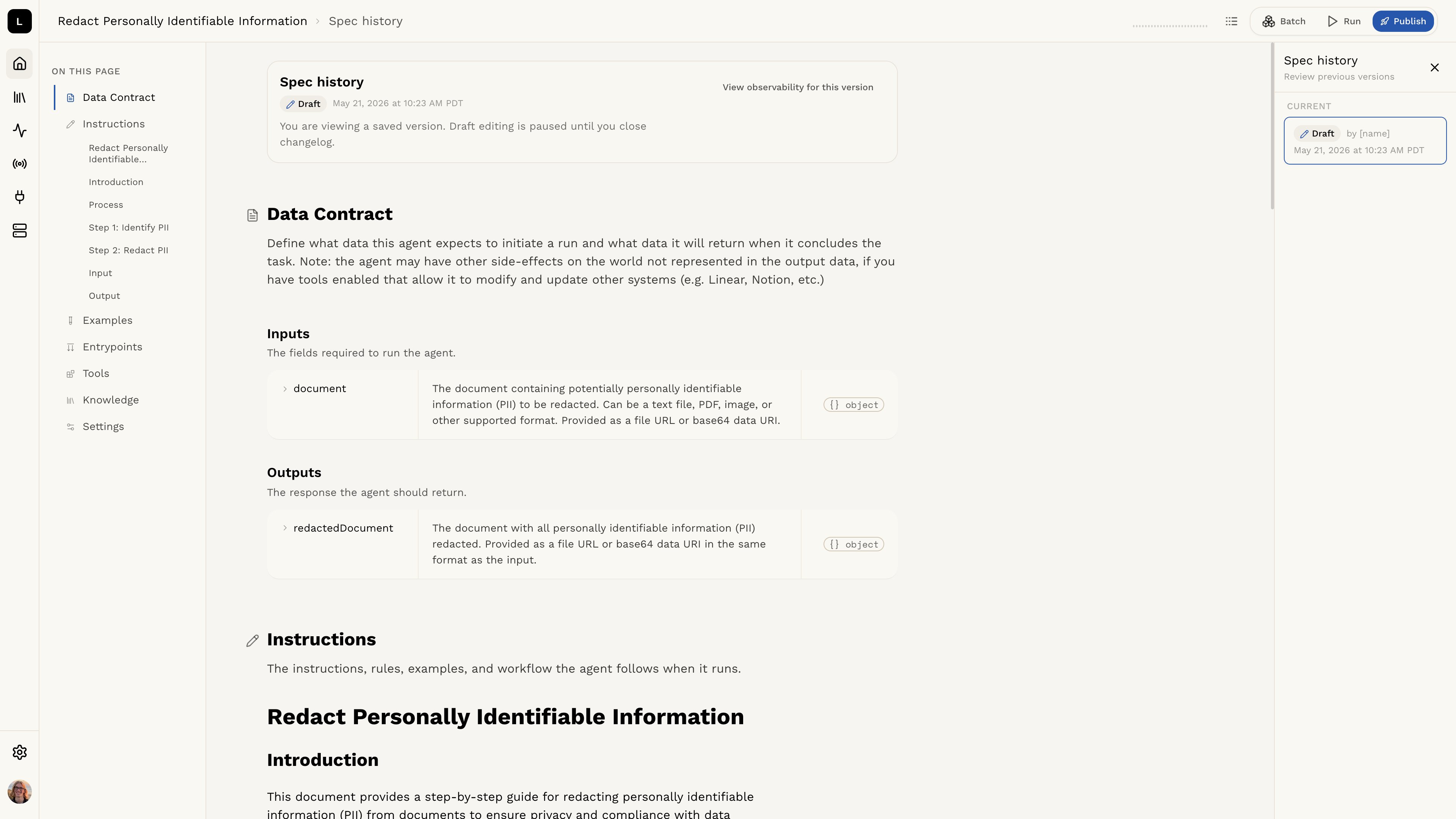 You can find the version ID of an agent in the Logic API dashboard. Each agent has a list of versions, and you can select the version you want to use.
You can also use the Logic API to list all versions of an agent using the `GET /agents/{id}/versions` endpoint. This will return a list of all versions of the agent, along with their version IDs.
### Example with `version`
Below are examples in several languages showing how to specify the version when calling an agent execution.
```bash curl theme={null}
curl -X POST 'https://api.logic.inc/v1/agents/{agent_id}/executions?version={version_id}'
-H "Authorization: Bearer $LOGIC_API_TOKEN"
-H "Content-Type: application/json"
-d '{
/* your input JSON here */
}'
```
```bash httpie theme={null}
http -A bearer -a $LOGIC_API_TOKEN POST 'https://api.logic.inc/v1/agents/{agent_id}/executions?version={version_id}'
--raw '{
{YOUR INPUT JSON HERE}
}'
```
```python python theme={null}
import requests
LOGIC_API_TOKEN = "ls-xxxxxxxxxxxxxxxxxxxxxxxxxxxxxxxxxxxxxxxxxxxxxxxx"
headers = {
"Authorization": f"Bearer {LOGIC_API_TOKEN}",
"Content-Type": "application/json"
}
response = requests.post(
"https://api.logic.inc/v1/agents/{agent_id}/executions?version={version_id}",
headers=headers,
json={
# Your input fields here
}
)
print(response.json())
```
```ruby ruby theme={null}
require 'net/http'
require 'json'
uri = URI('https://api.logic.inc/v1/agents/{agent_id}/executions?version={version_id}')
http = Net::HTTP.new(uri.host, uri.port)
http.use_ssl = uri.scheme == 'https'
LOGIC_API_TOKEN = 'ls-xxxxxxxxxxxxxxxxxxxxxxxxxxxxxxxxxxxxxxxxxxxxxxxx'
request = Net::HTTP::Post.new(uri)
request['Authorization'] = "Bearer #{LOGIC_API_TOKEN}"
request['Content-Type'] = 'application/json'
request.body = '{
/* your input here */
}'
response = http.request(request)
puts response.body
```
```javascript javascript theme={null}
const LOGIC_API_TOKEN = "ls-xxxxxxxxxxxxxxxxxxxxxxxxxxxxxxxxxxxxxxxxxxxxxxxx";
const response = await fetch(
"https://api.logic.inc/v1/agents/{agent_id}/executions?version={version_id}",
{
method: "POST",
headers: {
Authorization: `Bearer ${LOGIC_API_TOKEN}`,
"Content-Type": "application/json",
},
body: JSON.stringify({
// Your input fields here
}),
},
);
const data = await response.json();
console.log(data);
```
```go go theme={null}
package main
import (
"bytes"
"encoding/json"
"fmt"
"net/http"
"io/ioutil"
)
const (
LOGIC_API_TOKEN = "ls-xxxxxxxxxxxxxxxxxxxxxxxxxxxxxxxxxxxxxxxxxxxxxxxx"
)
func main() {
jsonStr := `{
{YOUR INPUT JSON HERE}
}`
// Create request
req, err := http.NewRequest("POST", "https://api.logic.inc/v1/agents/{agent_id}/executions?version={version_id}", bytes.NewBufferString(jsonStr))
if err != nil {
panic(err)
}
// Add headers
req.Header.Set("Content-Type", "application/json")
req.Header.Set("Authorization", "Bearer " + LOGIC_API_TOKEN)
// Send request
client := &http.Client{}
resp, err := client.Do(req)
if err != nil {
panic(err)
}
defer resp.Body.Close()
// Read response
body, err := ioutil.ReadAll(resp.Body)
if err != nil {
panic(err)
}
fmt.Println(string(body))
}
```
```java java theme={null}
// Java requires the OkHttp library. You can add it to your project using Maven or Gradle. Learn more in the Java Quick Start section of the API reference.
import okhttp3.*;
import java.io.IOException;
public class ApiClient {
private static final String LOGIC_API_TOKEN = "ls-xxxxxxxxxxxxxxxxxxxxxxxxxxxxxxxxxxxxxxxxxxxxxxxx";
public static void main(String[] args) {
OkHttpClient client = new OkHttpClient();
MediaType JSON = MediaType.get("application/json; charset=utf-8");
String jsonBody = """
{
// Your input fields here
}
""";
RequestBody body = RequestBody.create(jsonBody, JSON);
Request request = new Request.Builder()
.url("https://api.logic.inc/v1/agents/{agent_id}/executions?version={version_id}")
.post(body)
.addHeader("Authorization", "Bearer " + LOGIC_API_TOKEN)
.addHeader("Content-Type", "application/json")
.build();
try (Response response = client.newCall(request).execute()) {
String responseBody = response.body().string();
System.out.println(responseBody);
} catch (IOException e) {
e.printStackTrace();
}
}
}
```
You can find the version ID of an agent in the Logic API dashboard. Each agent has a list of versions, and you can select the version you want to use.
You can also use the Logic API to list all versions of an agent using the `GET /agents/{id}/versions` endpoint. This will return a list of all versions of the agent, along with their version IDs.
### Example with `version`
Below are examples in several languages showing how to specify the version when calling an agent execution.
```bash curl theme={null}
curl -X POST 'https://api.logic.inc/v1/agents/{agent_id}/executions?version={version_id}'
-H "Authorization: Bearer $LOGIC_API_TOKEN"
-H "Content-Type: application/json"
-d '{
/* your input JSON here */
}'
```
```bash httpie theme={null}
http -A bearer -a $LOGIC_API_TOKEN POST 'https://api.logic.inc/v1/agents/{agent_id}/executions?version={version_id}'
--raw '{
{YOUR INPUT JSON HERE}
}'
```
```python python theme={null}
import requests
LOGIC_API_TOKEN = "ls-xxxxxxxxxxxxxxxxxxxxxxxxxxxxxxxxxxxxxxxxxxxxxxxx"
headers = {
"Authorization": f"Bearer {LOGIC_API_TOKEN}",
"Content-Type": "application/json"
}
response = requests.post(
"https://api.logic.inc/v1/agents/{agent_id}/executions?version={version_id}",
headers=headers,
json={
# Your input fields here
}
)
print(response.json())
```
```ruby ruby theme={null}
require 'net/http'
require 'json'
uri = URI('https://api.logic.inc/v1/agents/{agent_id}/executions?version={version_id}')
http = Net::HTTP.new(uri.host, uri.port)
http.use_ssl = uri.scheme == 'https'
LOGIC_API_TOKEN = 'ls-xxxxxxxxxxxxxxxxxxxxxxxxxxxxxxxxxxxxxxxxxxxxxxxx'
request = Net::HTTP::Post.new(uri)
request['Authorization'] = "Bearer #{LOGIC_API_TOKEN}"
request['Content-Type'] = 'application/json'
request.body = '{
/* your input here */
}'
response = http.request(request)
puts response.body
```
```javascript javascript theme={null}
const LOGIC_API_TOKEN = "ls-xxxxxxxxxxxxxxxxxxxxxxxxxxxxxxxxxxxxxxxxxxxxxxxx";
const response = await fetch(
"https://api.logic.inc/v1/agents/{agent_id}/executions?version={version_id}",
{
method: "POST",
headers: {
Authorization: `Bearer ${LOGIC_API_TOKEN}`,
"Content-Type": "application/json",
},
body: JSON.stringify({
// Your input fields here
}),
},
);
const data = await response.json();
console.log(data);
```
```go go theme={null}
package main
import (
"bytes"
"encoding/json"
"fmt"
"net/http"
"io/ioutil"
)
const (
LOGIC_API_TOKEN = "ls-xxxxxxxxxxxxxxxxxxxxxxxxxxxxxxxxxxxxxxxxxxxxxxxx"
)
func main() {
jsonStr := `{
{YOUR INPUT JSON HERE}
}`
// Create request
req, err := http.NewRequest("POST", "https://api.logic.inc/v1/agents/{agent_id}/executions?version={version_id}", bytes.NewBufferString(jsonStr))
if err != nil {
panic(err)
}
// Add headers
req.Header.Set("Content-Type", "application/json")
req.Header.Set("Authorization", "Bearer " + LOGIC_API_TOKEN)
// Send request
client := &http.Client{}
resp, err := client.Do(req)
if err != nil {
panic(err)
}
defer resp.Body.Close()
// Read response
body, err := ioutil.ReadAll(resp.Body)
if err != nil {
panic(err)
}
fmt.Println(string(body))
}
```
```java java theme={null}
// Java requires the OkHttp library. You can add it to your project using Maven or Gradle. Learn more in the Java Quick Start section of the API reference.
import okhttp3.*;
import java.io.IOException;
public class ApiClient {
private static final String LOGIC_API_TOKEN = "ls-xxxxxxxxxxxxxxxxxxxxxxxxxxxxxxxxxxxxxxxxxxxxxxxx";
public static void main(String[] args) {
OkHttpClient client = new OkHttpClient();
MediaType JSON = MediaType.get("application/json; charset=utf-8");
String jsonBody = """
{
// Your input fields here
}
""";
RequestBody body = RequestBody.create(jsonBody, JSON);
Request request = new Request.Builder()
.url("https://api.logic.inc/v1/agents/{agent_id}/executions?version={version_id}")
.post(body)
.addHeader("Authorization", "Bearer " + LOGIC_API_TOKEN)
.addHeader("Content-Type", "application/json")
.build();
try (Response response = client.newCall(request).execute()) {
String responseBody = response.body().string();
System.out.println(responseBody);
} catch (IOException e) {
e.printStackTrace();
}
}
}
```