> ## Documentation Index
> Fetch the complete documentation index at: https://docs.logic.inc/llms.txt
> Use this file to discover all available pages before exploring further.
# Agent IDs
> How to get the ID of an agent using the Logic API
## Agent IDs
When you create an agent in Logic, it is assigned a unique identifier known as the agent ID. This ID is used to reference the agent in API requests and is essential for executing, updating, or deleting the agent.
You can find the agent ID in the Logic dashboard, or you can retrieve it using the Logic API. The agent ID is a UUID (Universally Unique Identifier) that looks like this: `a901abfe-398d-447d-a0cc-c071b40339f3`. You can also use the **agent slug**, which is a human-readable version of the agent ID that might look like this: `analyze-invoice-po-notes`.
### Retrieving the Agent slug via the dashboard
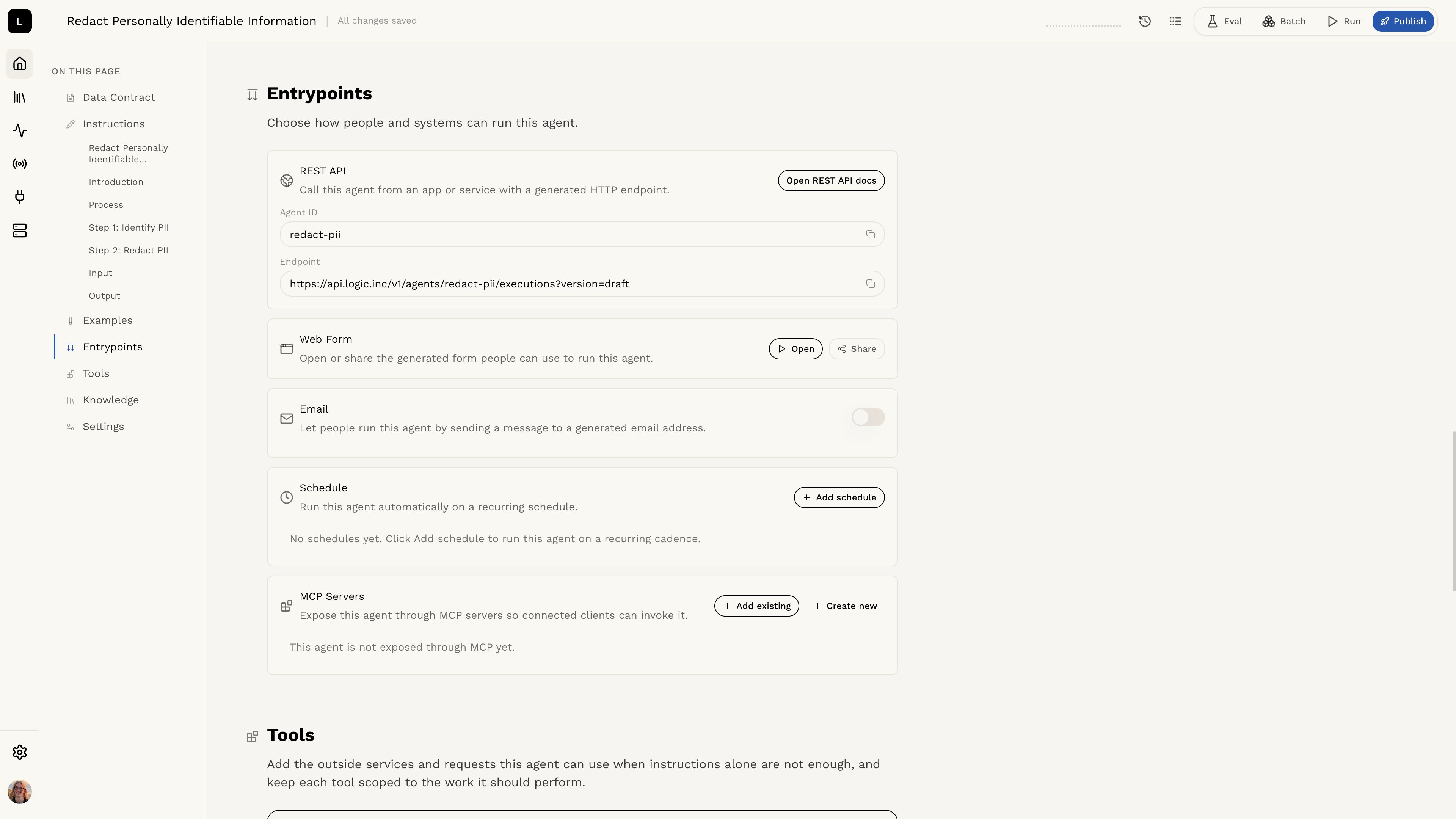 You can find the agent slug in the Logic dashboard by opening the agent and navigating to the **Entrypoints** section. The **REST API** card shows the **Agent ID** (slug) and the execution endpoint, which you can copy directly from there.
### Retrieving a List of Available Agents with the API
To retrieve a list of the agents available on your dashboard, you can use the `/v1/agents` endpoint. This will return a JSON object containing the ID of your agent, created and updated dates, the slug you can use to refer to it for API requests, and more.
```bash curl theme={null}
curl 'https://api.logic.inc/v1/agents/'
-H "Authorization: Bearer $LOGIC_API_TOKEN"
```
```bash httpie theme={null}
http GET https://api.logic.inc/v1/agents/
"Authorization:Bearer $LOGIC_API_TOKEN"
```
```python python theme={null}
import requests
headers = {
"Authorization": "Bearer YOUR_API_TOKEN"
}
response = requests.get("https://api.logic.inc/v1/agents/", headers=headers)
print(response.status_code, response.text)
```
```ruby ruby theme={null}
require 'net/http'
require 'json'
uri = URI('https://api.logic.inc/v1/agents/')
http = Net::HTTP.new(uri.host, uri.port)
http.use_ssl = uri.scheme == 'https'
LOGIC_API_TOKEN = 'ls-xxxxxxxxxxxxxxxxxxxxxxxxxxxxxxxxxxxxxxxxxxxxxxxx'
request = Net::HTTP::Get.new(uri)
request["Authorization"] = "Bearer #{LOGIC_API_TOKEN}"
response = http.request(request)
puts response.code
puts response.body
```
```javascript javascript theme={null}
const LOGIC_API_TOKEN = "ls-xxxxxxxxxxxxxxxxxxxxxxxxxxxxxxxxxxxxxxxxxxxxxxxx";
fetch("https://api.logic.inc/v1/agents/", {
headers: {
Authorization: `Bearer ${LOGIC_API_TOKEN}`,
},
})
.then((res) => res.text())
.then(console.log)
.catch(console.error);
```
```go go theme={null}
package main
import (
"fmt"
"net/http"
"io/ioutil"
)
const (
LOGIC_API_TOKEN = "ls-xxxxxxxxxxxxxxxxxxxxxxxxxxxxxxxxxxxxxxxxxxxxxxxx"
)
func main() {
url := "https://api.logic.inc/v1/agents/"
req, err := http.NewRequest("GET", url, nil)
if err != nil {
panic(err)
}
req.Header.Set("Authorization", "Bearer " + LOGIC_API_TOKEN)
client := &http.Client{}
resp, err := client.Do(req)
if err != nil {
panic(err)
}
defer resp.Body.Close()
body, err := ioutil.ReadAll(resp.Body)
if err != nil {
panic(err)
}
fmt.Println(string(body))
}
```
```java java theme={null}
// Java requires the OkHttp library. You can add it to your project using Maven or Gradle.
// Learn more in the Java Quick Start section of the API reference.
import okhttp3.*;
import java.io.IOException;
public class Main {
public static void main(String[] args) throws IOException {
OkHttpClient client = new OkHttpClient();
Request request = new Request.Builder()
.url("https://api.logic.inc/v1/agents/")
.addHeader("Authorization", "Bearer ls-xxxxxxxxxxxxxxxxxxxxxxxxxxxxxxxxxxxxxxxxxxxxxxxx")
.build();
try (Response response = client.newCall(request).execute()) {
if (!response.isSuccessful()) {
System.err.println("Request failed: " + response.code());
return;
}
System.out.println(response.body().string());
}
}
}
```
#### Example Agent List
```json theme={null}
[
{
"id": "a901abfe-398d-447d-a0cc-c071b40339f3",
"createdBy": "c04fdb6c-10e3-4abc-81ef-acd4c1b22ecb",
"createdAt": "2025-04-28T09:19:09.508Z",
"updatedAt": "2025-04-28T09:19:13.863Z",
"orgId": "00000000-0000-4000-a000-000000000001",
"currentVersionId": "da384a64-339e-422f-8a40-ccdb1cdcbe5e",
"description": null,
"draftVersionId": null,
"draftVersionStatus": null,
"slug": "analyze-invoice-po-notes",
"title": "Processing Invoices"
},
{
"id": "9fe247d4-bc32-4ad1-ae2b-ad36428e72ae",
"createdBy": "da384a64-339e-422f-8a40-ccdb1cdcbe5e",
"createdAt": "2024-10-17T06:28:46.832Z",
"updatedAt": "2025-04-28T08:49:20.067Z",
"orgId": "00000000-0000-4000-a000-000000000001",
"currentVersionId": "f262e499-41e3-42e3-a987-07b7c955eecc",
"description": "This guide standardizes the creation of Git commit messages for projects, ensuring each message clearly and concisely represents the staged changes while following a strict house style.",
"draftVersionId": "8eac5a51-4026-4a1d-bd50-9caf25bedefb",
"draftVersionStatus": "DRAFT",
"slug": "generate-commit-message-from-diff-and-branch",
"title": "Git Commit Message Guide"
}
]
```
### Retrieving a Specific Agent
You can also retrieve info for a specific agent by adding the ID or slug to the end of the `/v1/agents/` endpoint.
```bash curl theme={null}
curl 'https://api.logic.inc/v1/agents/{agent_id}/'
-H "Authorization: Bearer $LOGIC_API_TOKEN"
```
```bash httpie theme={null}
http GET https://api.logic.inc/v1/agents/{agent_id}/
"Authorization:Bearer $LOGIC_API_TOKEN"
```
```python python theme={null}
import requests
headers = {
"Authorization": "Bearer YOUR_API_TOKEN"
}
response = requests.get("https://api.logic.inc/v1/agents/{agent_id}/", headers=headers)
print(response.status_code, response.text)
```
```ruby ruby theme={null}
require 'net/http'
require 'json'
uri = URI('https://api.logic.inc/v1/agents/{agent_id}/')
http = Net::HTTP.new(uri.host, uri.port)
http.use_ssl = uri.scheme == 'https'
LOGIC_API_TOKEN = 'ls-xxxxxxxxxxxxxxxxxxxxxxxxxxxxxxxxxxxxxxxxxxxxxxxx'
request = Net::HTTP::Get.new(uri)
request["Authorization"] = "Bearer #{LOGIC_API_TOKEN}"
response = http.request(request)
puts response.code
puts response.body
```
```javascript javascript theme={null}
const LOGIC_API_TOKEN = "ls-xxxxxxxxxxxxxxxxxxxxxxxxxxxxxxxxxxxxxxxxxxxxxxxx";
fetch("https://api.logic.inc/v1/agents/{agent_id}/", {
headers: {
Authorization: `Bearer ${LOGIC_API_TOKEN}`,
},
})
.then((res) => res.text())
.then(console.log)
.catch(console.error);
```
```go go theme={null}
package main
import (
"fmt"
"net/http"
"io/ioutil"
)
const (
LOGIC_API_TOKEN = "ls-xxxxxxxxxxxxxxxxxxxxxxxxxxxxxxxxxxxxxxxxxxxxxxxx"
)
func main() {
url := "https://api.logic.inc/v1/agents/{agent_id}/"
req, err := http.NewRequest("GET", url, nil)
if err != nil {
panic(err)
}
req.Header.Set("Authorization", "Bearer " + LOGIC_API_TOKEN)
client := &http.Client{}
resp, err := client.Do(req)
if err != nil {
panic(err)
}
defer resp.Body.Close()
body, err := ioutil.ReadAll(resp.Body)
if err != nil {
panic(err)
}
fmt.Println(string(body))
}
```
```java java theme={null}
// Java requires the OkHttp library. You can add it to your project using Maven or Gradle.
// Learn more in the Java Quick Start section of the API reference.
import okhttp3.*;
import java.io.IOException;
public class Main {
public static void main(String[] args) throws IOException {
OkHttpClient client = new OkHttpClient();
Request request = new Request.Builder()
.url("https://api.logic.inc/v1/agents/{agent_id}/")
.addHeader("Authorization", "Bearer ls-xxxxxxxxxxxxxxxxxxxxxxxxxxxxxxxxxxxxxxxxxxxxxxxx")
.build();
try (Response response = client.newCall(request).execute()) {
if (!response.isSuccessful()) {
System.err.println("Request failed: " + response.code());
return;
}
System.out.println(response.body().string());
}
}
}
```
Replace any **\{id}** in the example code, such as **\{agent\_id}** with the ID you need for your specific API call.
You can find the agent slug in the Logic dashboard by opening the agent and navigating to the **Entrypoints** section. The **REST API** card shows the **Agent ID** (slug) and the execution endpoint, which you can copy directly from there.
### Retrieving a List of Available Agents with the API
To retrieve a list of the agents available on your dashboard, you can use the `/v1/agents` endpoint. This will return a JSON object containing the ID of your agent, created and updated dates, the slug you can use to refer to it for API requests, and more.
```bash curl theme={null}
curl 'https://api.logic.inc/v1/agents/'
-H "Authorization: Bearer $LOGIC_API_TOKEN"
```
```bash httpie theme={null}
http GET https://api.logic.inc/v1/agents/
"Authorization:Bearer $LOGIC_API_TOKEN"
```
```python python theme={null}
import requests
headers = {
"Authorization": "Bearer YOUR_API_TOKEN"
}
response = requests.get("https://api.logic.inc/v1/agents/", headers=headers)
print(response.status_code, response.text)
```
```ruby ruby theme={null}
require 'net/http'
require 'json'
uri = URI('https://api.logic.inc/v1/agents/')
http = Net::HTTP.new(uri.host, uri.port)
http.use_ssl = uri.scheme == 'https'
LOGIC_API_TOKEN = 'ls-xxxxxxxxxxxxxxxxxxxxxxxxxxxxxxxxxxxxxxxxxxxxxxxx'
request = Net::HTTP::Get.new(uri)
request["Authorization"] = "Bearer #{LOGIC_API_TOKEN}"
response = http.request(request)
puts response.code
puts response.body
```
```javascript javascript theme={null}
const LOGIC_API_TOKEN = "ls-xxxxxxxxxxxxxxxxxxxxxxxxxxxxxxxxxxxxxxxxxxxxxxxx";
fetch("https://api.logic.inc/v1/agents/", {
headers: {
Authorization: `Bearer ${LOGIC_API_TOKEN}`,
},
})
.then((res) => res.text())
.then(console.log)
.catch(console.error);
```
```go go theme={null}
package main
import (
"fmt"
"net/http"
"io/ioutil"
)
const (
LOGIC_API_TOKEN = "ls-xxxxxxxxxxxxxxxxxxxxxxxxxxxxxxxxxxxxxxxxxxxxxxxx"
)
func main() {
url := "https://api.logic.inc/v1/agents/"
req, err := http.NewRequest("GET", url, nil)
if err != nil {
panic(err)
}
req.Header.Set("Authorization", "Bearer " + LOGIC_API_TOKEN)
client := &http.Client{}
resp, err := client.Do(req)
if err != nil {
panic(err)
}
defer resp.Body.Close()
body, err := ioutil.ReadAll(resp.Body)
if err != nil {
panic(err)
}
fmt.Println(string(body))
}
```
```java java theme={null}
// Java requires the OkHttp library. You can add it to your project using Maven or Gradle.
// Learn more in the Java Quick Start section of the API reference.
import okhttp3.*;
import java.io.IOException;
public class Main {
public static void main(String[] args) throws IOException {
OkHttpClient client = new OkHttpClient();
Request request = new Request.Builder()
.url("https://api.logic.inc/v1/agents/")
.addHeader("Authorization", "Bearer ls-xxxxxxxxxxxxxxxxxxxxxxxxxxxxxxxxxxxxxxxxxxxxxxxx")
.build();
try (Response response = client.newCall(request).execute()) {
if (!response.isSuccessful()) {
System.err.println("Request failed: " + response.code());
return;
}
System.out.println(response.body().string());
}
}
}
```
#### Example Agent List
```json theme={null}
[
{
"id": "a901abfe-398d-447d-a0cc-c071b40339f3",
"createdBy": "c04fdb6c-10e3-4abc-81ef-acd4c1b22ecb",
"createdAt": "2025-04-28T09:19:09.508Z",
"updatedAt": "2025-04-28T09:19:13.863Z",
"orgId": "00000000-0000-4000-a000-000000000001",
"currentVersionId": "da384a64-339e-422f-8a40-ccdb1cdcbe5e",
"description": null,
"draftVersionId": null,
"draftVersionStatus": null,
"slug": "analyze-invoice-po-notes",
"title": "Processing Invoices"
},
{
"id": "9fe247d4-bc32-4ad1-ae2b-ad36428e72ae",
"createdBy": "da384a64-339e-422f-8a40-ccdb1cdcbe5e",
"createdAt": "2024-10-17T06:28:46.832Z",
"updatedAt": "2025-04-28T08:49:20.067Z",
"orgId": "00000000-0000-4000-a000-000000000001",
"currentVersionId": "f262e499-41e3-42e3-a987-07b7c955eecc",
"description": "This guide standardizes the creation of Git commit messages for projects, ensuring each message clearly and concisely represents the staged changes while following a strict house style.",
"draftVersionId": "8eac5a51-4026-4a1d-bd50-9caf25bedefb",
"draftVersionStatus": "DRAFT",
"slug": "generate-commit-message-from-diff-and-branch",
"title": "Git Commit Message Guide"
}
]
```
### Retrieving a Specific Agent
You can also retrieve info for a specific agent by adding the ID or slug to the end of the `/v1/agents/` endpoint.
```bash curl theme={null}
curl 'https://api.logic.inc/v1/agents/{agent_id}/'
-H "Authorization: Bearer $LOGIC_API_TOKEN"
```
```bash httpie theme={null}
http GET https://api.logic.inc/v1/agents/{agent_id}/
"Authorization:Bearer $LOGIC_API_TOKEN"
```
```python python theme={null}
import requests
headers = {
"Authorization": "Bearer YOUR_API_TOKEN"
}
response = requests.get("https://api.logic.inc/v1/agents/{agent_id}/", headers=headers)
print(response.status_code, response.text)
```
```ruby ruby theme={null}
require 'net/http'
require 'json'
uri = URI('https://api.logic.inc/v1/agents/{agent_id}/')
http = Net::HTTP.new(uri.host, uri.port)
http.use_ssl = uri.scheme == 'https'
LOGIC_API_TOKEN = 'ls-xxxxxxxxxxxxxxxxxxxxxxxxxxxxxxxxxxxxxxxxxxxxxxxx'
request = Net::HTTP::Get.new(uri)
request["Authorization"] = "Bearer #{LOGIC_API_TOKEN}"
response = http.request(request)
puts response.code
puts response.body
```
```javascript javascript theme={null}
const LOGIC_API_TOKEN = "ls-xxxxxxxxxxxxxxxxxxxxxxxxxxxxxxxxxxxxxxxxxxxxxxxx";
fetch("https://api.logic.inc/v1/agents/{agent_id}/", {
headers: {
Authorization: `Bearer ${LOGIC_API_TOKEN}`,
},
})
.then((res) => res.text())
.then(console.log)
.catch(console.error);
```
```go go theme={null}
package main
import (
"fmt"
"net/http"
"io/ioutil"
)
const (
LOGIC_API_TOKEN = "ls-xxxxxxxxxxxxxxxxxxxxxxxxxxxxxxxxxxxxxxxxxxxxxxxx"
)
func main() {
url := "https://api.logic.inc/v1/agents/{agent_id}/"
req, err := http.NewRequest("GET", url, nil)
if err != nil {
panic(err)
}
req.Header.Set("Authorization", "Bearer " + LOGIC_API_TOKEN)
client := &http.Client{}
resp, err := client.Do(req)
if err != nil {
panic(err)
}
defer resp.Body.Close()
body, err := ioutil.ReadAll(resp.Body)
if err != nil {
panic(err)
}
fmt.Println(string(body))
}
```
```java java theme={null}
// Java requires the OkHttp library. You can add it to your project using Maven or Gradle.
// Learn more in the Java Quick Start section of the API reference.
import okhttp3.*;
import java.io.IOException;
public class Main {
public static void main(String[] args) throws IOException {
OkHttpClient client = new OkHttpClient();
Request request = new Request.Builder()
.url("https://api.logic.inc/v1/agents/{agent_id}/")
.addHeader("Authorization", "Bearer ls-xxxxxxxxxxxxxxxxxxxxxxxxxxxxxxxxxxxxxxxxxxxxxxxx")
.build();
try (Response response = client.newCall(request).execute()) {
if (!response.isSuccessful()) {
System.err.println("Request failed: " + response.code());
return;
}
System.out.println(response.body().string());
}
}
}
```
Replace any **\{id}** in the example code, such as **\{agent\_id}** with the ID you need for your specific API call.